Finding the best radar detector app can save you from a costly speeding ticket on your next drive.
Millions of drivers now rely on GPS-based apps that warn about speed cameras, speed traps, and police positions in real time.
Below you’ll find how these apps work, how they compare to hardware detectors, and which options consistently top the charts right now.
What a radar detector app actually does
A best radar detector app does not detect radar beams the way a hardware unit does. Your phone’s hardware has no radar receiver. What these apps do instead is rely on crowdsourced data: millions of users report speed cameras, police positions, and speed traps in real time, and the app pushes those alerts to your screen as you approach.
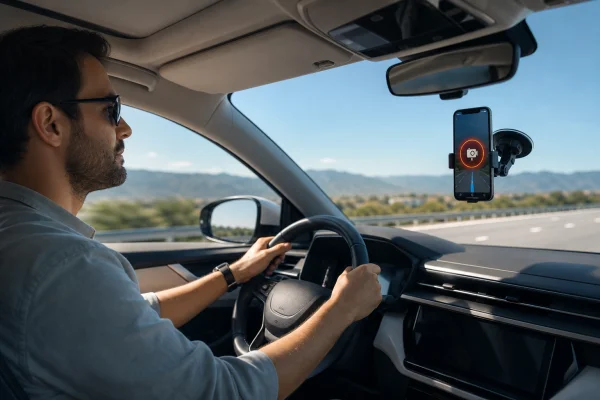
The two main alert types are fixed speed cameras (permanently installed on roads) and mobile speed traps (user-reported officer positions). Fixed cameras are extremely reliable since they’re mapped by the app’s database. Mobile reports expire after a few minutes if no other driver confirms them.
ℹ️ Note: Apps like Waze and Radarbot are legal in the U.S. and most countries. Using them while driving is permitted, but operating the app itself while holding your phone is not: always mount your device or use a hands-free setup.
Best radar detector app for Android and iOS
The best police radar detector app options available right now cover both Android and iOS. Each has different strengths depending on how you drive.
Waze: the most popular free option
Waze is the go-to choice for most drivers looking for the best app for police radar without spending anything. It has over 140 million active users worldwide, and that crowd is what makes it work. The more people on the road using Waze, the faster police position reports get pinned to the map.
Waze alerts you to speed cameras, speed traps, accidents, road hazards, and construction. The app also adjusts your route in real time to avoid traffic. It runs on both Android and iOS and integrates with Android Auto and Apple CarPlay.
📲 DOWNLOAD WAZE: ANDROID
📲 DOWNLOAD WAZE: IOS
Radarbot: best app for speed cameras specifically
Radarbot is the strongest choice if your main concern is speed camera alerts rather than live police positions. It has a database of over 500,000 fixed speed cameras worldwide and recognizes more than 200 camera models.
The free version covers basic camera alerts. The premium version (around $3.99/month) adds real-time traffic alerts, mobile speed traps, and offline mode. It works well in Europe, where fixed camera networks are denser than in the U.S.
📷 DOWNLOAD RADARBOT: ANDROID
📷 DOWNLOAD RADARBOT: IOS
Google Maps speed alerts: the built-in option everyone already has
Google Maps added speed camera warnings and speed limit displays to its navigation interface in 2019. For most casual drivers, this built-in feature covers the basic need without any extra app download.
When you’re actively navigating in Google Maps, you’ll see your current speed displayed in the bottom corner. If you exceed the posted limit, the number turns red. Speed camera warnings pop up as icon alerts along your route with an audio cue, exactly like a dedicated radar app.
The limitations are real, though. Google Maps speed alerts only work while actively navigating to a destination. If you’re just driving around without a set route, the warnings are off. Community-reported mobile speed trap data is also less dense than Waze’s, since Waze has a more active real-time reporting culture among its users.
If you already use Google Maps for navigation and only need basic speed camera awareness, it’s worth enabling the feature before downloading anything else. Go to Settings → Navigation Settings → Speedometer to turn on the speed display.
Do radar detector apps replace hardware devices
The short answer is: for most drivers, yes. The long answer depends on where you drive.
A best android radar detector app running on your phone covers the two scenarios that generate most speeding tickets: fixed speed cameras and known speed trap locations. Hardware detectors, on the other hand, pick up actual radar signals from patrol cars running instant-on guns: something no app can do.
If you drive fast on rural highways or interstates where police use instant-on radar guns without cameras, a dedicated hardware detector adds meaningful protection that no app can replicate.
GPS with police radar detector app: how location improves accuracy
A gps with police radar detector app uses your exact position to trigger alerts at the right distance before a camera. Good apps give you a warning at 500 to 1,000 meters, enough time to check your speed without braking sharply.
GPS accuracy on modern smartphones is sufficient for camera alerts on most roads. The issue arises at highway speeds: at 100 km/h, you cover 28 meters per second. An app that lags even slightly in GPS refresh can trigger the alert too late.
Top-rated apps compensate by using predictive positioning: they calculate your approach trajectory and fire the alert slightly ahead of your actual GPS position. Radarbot and Speed Camera Radar both do this well.
Best speed trap app tips for first-time users
Setting up your app correctly makes a bigger difference than which app you choose. A few quick settings changes improve alert timing and reduce false positives.
- Set alert distance to at least 800 meters for highway driving, 400 meters for city roads.
- Enable audio alerts so you don’t need to look at the screen while driving.
- Turn on community reporting in Waze so your data helps other drivers too.
- Mount your phone on the windshield or dashboard: GPS accuracy drops when the phone is lying flat on a seat.
The best speed camera radar app experience comes from using it consistently. The more you drive with it active, the more calibrated the alerts feel to your usual routes.
Whether you choose a free option like Waze or a premium app like Radarbot, you’ll be better prepared every time you get behind the wheel.
ℹ️ Note: This content is independent and informational only. We have no affiliation, sponsorship, or control over the apps or companies mentioned. Always obey posted speed limits and local traffic laws.