Applying for Lifeline online takes less than 10 minutes if you have your documents ready.
The federal Lifeline program gives qualifying households a free smartphone and free monthly service — and the entire application process can be done from your phone, tablet, or computer right now.
Follow this guide step by step and get your approval as fast as possible — some applicants get confirmed the same day.
What Is the Lifeline Program and Why Should You Apply?
The Lifeline Assistance Program is a federal benefit administered by the Universal Service Administrative Company (USAC) under the oversight of the Federal Communications Commission (FCC).
It provides a monthly discount of up to $9.25 on qualifying phone or internet service — and up to $34.25 for households on Tribal lands. Participating carriers use this subsidy to offer eligible customers:
- A free Android smartphone (or, at select carriers, a free iPhone)
- Free unlimited talk and text
- Free monthly data (typically 4.5 GB to 15 GB depending on carrier and state)
- No monthly bill, no contract, no credit check
As of 2026, the Lifeline program is fully active and funded. The Affordable Connectivity Program (ACP) ended in May 2024 — Lifeline is the current and only federal program providing free wireless service to low-income households.
Do You Qualify? Quick Eligibility Check Before You Apply
Before you start the online application, verify that you meet at least one of the following requirements.
You qualify by income if your household gross income is at or below 135% of the Federal Poverty Guidelines:
- 1-person household: ~$20,331/year
- 2-person household: ~$27,594/year
- 4-person household: ~$41,625/year
You qualify automatically by program participation if you or anyone in your household is enrolled in:
- SNAP (food stamps)
- Medicaid
- Supplemental Security Income (SSI)
- Federal Public Housing Assistance (Section 8)
- Veterans Pension or Survivors Benefit
- Qualifying Tribal programs
If you meet either condition, you’re ready to apply. The online process will verify your eligibility automatically in most cases — no waiting for a letter or visiting an office.
Documents to Gather Before You Start
Having your documents ready before you begin saves time and reduces the chance of delays. Here’s what you may need depending on your eligibility path.
For income-based applicants:
- Last year’s federal or state income tax return (front page only is fine)
- Three consecutive pay stubs dated within the last 12 months
- Social Security award letter or pension statement
For program-based applicants:
- Current SNAP award letter, benefits statement, or approval notice
- Current Medicaid card or benefits letter from Medicaid
- SSI benefits statement or notification letter dated within the past 12 months
- Official documentation from any other qualifying federal program
For proof of identity and address (all applicants):
- Government-issued photo ID (driver’s license, state ID, or passport)
- Last four digits of your Social Security number or Tribal ID
- Proof of current address: a recent utility bill, lease agreement, or government mail dated within the past 90 days
Important: Never submit your full Social Security number to an unverified source. Only enter SSN-related information on the official National Verifier at checklifeline.org or lifelinesupport.org — both are operated by USAC under federal oversight.
Step-by-Step: How to Apply for Lifeline Online
There are three official ways to apply for Lifeline online. The most common — and fastest — is through the National Verifier.
Step 1: Visit the National Verifier
Go to checklifeline.org or lifelinesupport.org. These are the official USAC-operated websites where the entire eligibility verification process takes place.
If you live in Texas or Oregon, you’ll need to use your state’s own Lifeline application process instead. The National Verifier will redirect you if this applies to your address.
Step 2: Create an Account
Click “Apply for Lifeline” and create a free account using your email address. This account lets you track your application status, upload documents, and manage your benefit once approved.
Step 3: Enter Your Personal Information
You’ll be asked to provide:
- Full legal name (as it appears on your ID)
- Date of birth
- Current address
- Last four digits of your Social Security number or Tribal ID number
This information is used to verify your identity and match you against federal benefit databases. The system is secure and encrypted.
Step 4: Select Your Eligibility Path
You’ll be prompted to indicate how you qualify: by income or by participation in a government program.
If you choose program-based eligibility, select the program you or your household member is enrolled in. The National Verifier will attempt to confirm your participation automatically through connected federal databases — many applicants are approved instantly without needing to upload any documents.
If you choose income-based eligibility, you’ll need to enter your total household income and may need to upload a document as proof.
Step 5: Upload Supporting Documents (If Required)
If the National Verifier cannot automatically confirm your eligibility through its databases, it will ask you to upload documentation.
Documents must be:
- Clear and legible (photos or scans both work)
- Dated within the past 12 months
- In accepted formats: JPG, PNG, or PDF
Upload each document in the appropriate section and submit. The review process for manually submitted applications typically takes 1–7 business days.
Step 6: Choose a Participating Lifeline Carrier
Once your eligibility is confirmed, you’ll need to select a Lifeline provider to receive your free phone and service.
Use the “Companies Near Me” tool at lifelinesupport.org/companies to find FCC-authorized providers operating in your state. Enter your ZIP code to see available options.
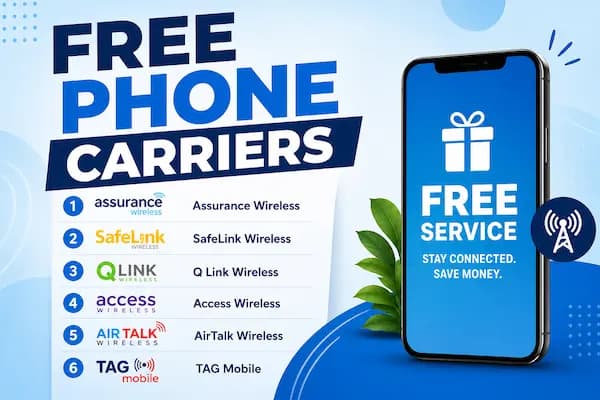
Top providers to consider:
- Assurance Wireless — T-Mobile network, free Android phone, unlimited talk/text/data
- SafeLink Wireless — Verizon network, available in all 50 states
- Q Link Wireless — T-Mobile network, BYOD support for unlocked phones
- AirTalk Wireless — T-Mobile network, iPhone options available in select states
- TAG Mobile — up to 15 GB data/month, free international calling
You can also apply directly through a carrier instead of starting at the National Verifier. Many carriers have their own Lifeline enrollment page that submits the National Verifier application on your behalf — this can be easier and faster for first-time applicants.
Step 7: Complete the Carrier Enrollment
After choosing your carrier, complete their enrollment form. You’ll confirm your personal details, the address where you want your free phone shipped, and any carrier-specific preferences.
Most carriers approve and ship free phones within 3–7 business days of final approval. Some local carriers or in-person enrollment locations can activate service the same day.
Alternative: Apply by Mail
If you prefer not to apply online, you can download the Lifeline Application Form (FCC Form 5629) from lifelinesupport.org/tools-and-resources/forms, fill it out by hand or with Adobe Reader, attach copies of your eligibility documents (not originals), and mail everything to:
USAC Lifeline Support Center
P.O. Box 9100
Wilkes-Barre, PA 18773
Mail applications typically take 7–10 business days to process after USAC receives them. If you need help, call the Lifeline Support Center at 1-800-234-9473 — they’re available 7 days a week from 9 AM to 9 PM ET.
What to Do If Your Application Is Denied
Application denials happen, and most are fixable. Common reasons include:
- Expired documents: Your benefit letter or pay stubs are older than 12 months — submit current versions
- Another Lifeline benefit at your address: Someone else at your address is already enrolled — contact USAC if you maintain a separate economic household
- Incorrect income: If denied on income grounds but you’re enrolled in a qualifying program, resubmit using program-based eligibility instead
- Illegible documents: Blurry photos or hard-to-read uploads — retake with better lighting and resubmit
You have 60 days from the date of denial to appeal or resubmit your application. Don’t give up on the first attempt — most issues are resolved with a simple document correction.
After Approval: Keeping Your Benefit Active
Once you’re enrolled, there are two rules to follow to keep your free service running:
Use your phone every 30 days: If your carrier provides service without charging a monthly fee, federal rules require that you use the phone at least once per month — a call, text, or data session counts. Inactivity leads to service suspension.
Recertify annually: Every 12 months, USAC will send you a recertification notice. You must confirm that your income or program participation still makes you eligible. This takes just a few minutes online. Miss it, and your service ends.
Apply Today — There’s No Reason to Wait
The Lifeline application process is free, takes about 10 minutes, and many people are approved the same day they apply. A free smartphone and free monthly service are waiting if you qualify — the only thing standing between you and that benefit is a completed application.
Start at checklifeline.org, confirm your eligibility, choose a carrier, and get your free phone on its way.
Disclaimer: This content is for informational purposes only. We are not affiliated with the FCC, USAC, or any participating Lifeline carrier. Application procedures, eligibility requirements, and benefit amounts may change. Always verify current program details at official government sources before applying.